



Search for any GP, dentist, or specialist near you, and the first thing you’ll see isn’t their website it’s a small card on the right of Google, showing a star rating, opening hours, and a “Directions” button. That card is a Google Business Profile, and for most patients today, it’s the actual front door to a medical practice.
If you’re a doctor, dentist, physiotherapist, or clinic owner in the UK, understanding how to set up and manage your Google Business Profile for doctors isn’t just a marketing nice-to-have anymore. It’s often the first and sometimes only impression a prospective patient forms of your practice before they decide whether to call, book online, or scroll past to a competitor.
This guide walks through what a Google Business Profile actually does for a medical practice, how to set one up properly, what affects your visibility, and where the line sits between helpful patient information and medical advice you shouldn’t be giving through a business listing.
What Is a Google Business Profile, Exactly?
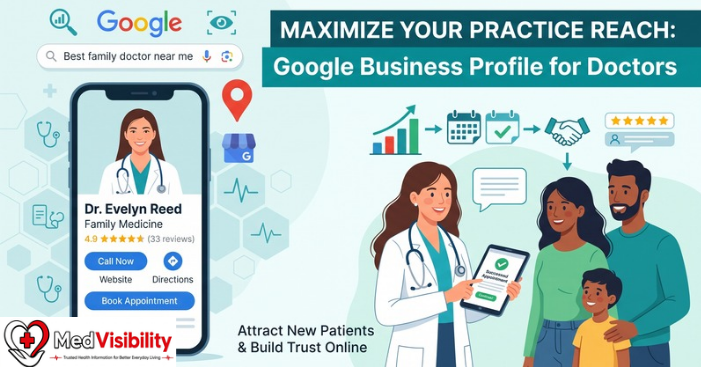
A Google Business Profile (GBP) formerly known as Google My Business is a free listing that controls how your practice appears across Google Search and Google Maps. It typically shows:
- Your practice name, address, and phone number
- Opening hours (including holiday hours)
- Photos of your clinic, team, and premises
- A short business description and list of services
- Patient reviews and star ratings
- A “Book” or “Website” button, where enabled
- Q&A from the public
- Posts and updates you publish directly
For a medical practice, this listing often appears before your actual website does, particularly on mobile search and in the “local map pack” the group of three business listings shown under a map when someone searches something like “dentist near me” or “GP accepting new patients.”
Why It Matters More for Medical Practices Than for Most Businesses
Healthcare searches carry more weight than searches for, say, a coffee shop. People searching for a doctor are often anxious, in discomfort, or trying to make a decision quickly on behalf of themselves or a family member. That context changes what “good visibility” means.
A few things make GBP particularly important in a medical context: google business profile for doctors.
Trust is decided in seconds. Most people glance at your star rating and a couple of reviews before they even open your website. A profile with old information, no reviews, or an unclaimed listing can quietly cost you patients you never knew were looking.
Local searches convert into calls and visits quickly. Searches like “dentist near me open now” or “paediatrician accepting new patients” tend to lead to fast action — a phone call or a walk-in — rather than lengthy research. If your hours are wrong or your listing is inactive, that patient simply moves to the next result. google business profile for doctors.
Unclaimed profiles can be edited by anyone. If you haven’t claimed your listing, Google sometimes allows public “suggested edits” to go through unchecked, which can leave incorrect hours, services, or even a wrong phone number live on your profile without your knowledge.
It shapes first impressions before your website does. Photos of a clean, welcoming clinic and a handful of thoughtful review responses can do more to reassure a nervous patient than a well-designed homepage ever could. google business profile for doctors.
How to Set Up a Google Business Profile as a Doctor
If you don’t already have a listing — or you’re not sure whether one exists — here’s the general process.
1. Search for Your Practice First
Before creating anything new, search your practice name (and your own name, if you see patients individually) on Google. Duplicate or auto-generated listings are common in healthcare, especially for practices with multiple doctors under one roof, so check what’s already there before starting fresh.
2. Claim or Create the Listing
If a profile already exists, claim it through Google Business Profile Manager. If nothing comes up, you can create a new one directly from Google’s business listing tools.
3. Complete Verification
Google will ask you to confirm you’re authorised to manage the listing, usually through a phone call, text message, email, or postcard sent to the practice address. This step exists to stop unauthorised people from editing details for a business they don’t run.
4. Fill In Every Section Accurately
Incomplete profiles tend to rank and convert worse than complete ones. At minimum, this should include:
- Correct practice name (avoid keyword-stuffing, e.g. don’t add “Best Dentist London” into the business name field — this breaches Google’s guidelines and can get a listing suspended)
- Accurate address and service area, if applicable
- Direct phone number
- Website link
- Real opening hours, including any lunch closures or half-days
- Categories that reflect what you actually do (e.g. “General practitioner,” “Dermatologist,” “Family dentist”)
5. Decide on Individual vs Practice Listings
Google generally allows an individual, public-facing practitioner with their own patient base to have a separate profile from the clinic’s main location listing, provided that doctor works in a patient-facing role and can genuinely be reached at the verified address. Larger multi-doctor practices often use one main practice profile, with individual clinicians optionally listed separately. google business profile for doctors.
What Actually Affects Your Ranking in Local Search
Google doesn’t publish an exact formula, but based on how local search consistently behaves, three broad factors decide which practices appear at the top of local results:
| Ranking Factor | What It Means for a Medical Practice |
|---|---|
| Relevance | How well your profile and categories match what the searcher typed (e.g. “physiotherapist for back pain”) |
| Distance | How close your practice is to the person searching, or to the location they searched for |
| Prominence | How well-known and active your practice appears — review volume, review quality, website authority, and consistent activity on your profile |
Of these three, prominence is the one you have the most ongoing control over. A practice with 150 thoughtful reviews and monthly updates will typically outrank a similarly located competitor with five reviews and a static, unattended listing. google business profile for doctors.
Practical Ways to Strengthen Your Profile
Keep Information Consistently Accurate
Inconsistent details across your website, GBP listing, and other directories (Healthgrades, NHS.uk listings, insurance directories) can quietly undermine your visibility. Check that your name, address, and phone number match everywhere they appear online.
Use Real, Recent Photos
Genuine photos of your reception area, treatment rooms, and team tend to perform better than stock imagery. Patients researching a clinic often want to know what to expect before they walk in — it’s a small thing that reduces first-visit anxiety. google business profile for doctors.
Respond to Reviews Thoughtfully
Responding shows patients you’re engaged, but healthcare reviews need a careful hand. You should never confirm that a reviewer was a patient, discuss any specifics of their visit, or reveal any identifying details — doing so risks a confidentiality breach. Keep responses brief, warm, and general: thank the reviewer, acknowledge their feedback, and invite them to contact the practice directly if there’s a concern to resolve.
Post Updates Regularly
Google allows short posts on your profile — new services, holiday hours, flu clinic dates, or a welcome message for a new team member. Practices that post consistently tend to appear more “alive” to both patients and to Google’s ranking systems, compared with listings that haven’t been touched in a year.
Use the Q&A Section Proactively
Anyone can ask a question on your profile, and anyone can answer it — including people with no connection to your practice. Seed the section yourself with common questions (“Do you accept walk-ins?” “Is there parking on site?”) and keep an eye on it so incorrect answers don’t sit there unaddressed.
Add Accurate Service Categories and Attributes
Google lets you flag accessibility features (step-free access, accessible parking, hearing loops), languages spoken, and appointment-only status. These small details often decide whether a patient with specific needs chooses you over a competitor. google business profile for doctors.
What a Google Business Profile Should Never Be Used For
It’s worth being clear-eyed about the limits here, because this is health-adjacent content and the boundary matters. google business profile for doctors.
A Google Business Profile is a discovery and logistics tool — it helps patients find you, understand what you offer, and decide whether to get in touch. It is not, and should never become, a channel for:
- Diagnosing conditions based on a review or Q&A question
- Giving medication or treatment advice through posts or responses
- Discussing a specific patient’s case or confirming someone was treated at your practice
- Making guaranteed or exaggerated claims about outcomes (“guaranteed pain-free,” “100% success rate”)
If a patient asks something clinical through your Q&A or reviews, the safest response is almost always to invite them to call the practice or book an appointment, rather than answering the clinical question in a public, unmoderated space. google business profile for doctors.
When to Get Extra Support Managing Your Profile
For a single-location practice, managing a Google Business Profile is usually manageable in-house with 20–30 minutes a week. For multi-location practices, or clinics with several doctors listed individually, keeping every listing accurate, consistent, and actively managed can become a genuine administrative burden — which is why many practices bring in a healthcare marketing specialist or reputation management service once they scale past two or three sites.
If you’re unsure whether your current listing is complete, search your own practice name from a personal (not admin) device and see what a patient would actually see. It’s often the fastest way to spot a wrong phone number, an outdated photo, or a review that’s been sitting unanswered for months.
Key Takeaways
- A Google Business Profile is often the first thing a prospective patient sees — before your website.
- Claiming and verifying your listing protects you from unmanaged public edits.
- Local ranking depends mainly on relevance, distance, and prominence — and prominence is the part you can actively influence.
- Review responses should stay brief and general to avoid confidentiality issues.
- Regular posts, accurate categories, and real photos all support stronger visibility.
- The profile is for discovery and logistics — never for diagnosis or treatment advice.
FAQs
Is Google Business Profile free for doctors and clinics?
Creating, claiming, and managing a Google Business Profile costs nothing. Some practices choose to pay for additional marketing or reputation management support around it, but the listing itself is free.
Can I have a separate profile from my practice if I’m one of several doctors there?
Often, yes — if you’re a public-facing practitioner with your own patient base and can be reached at the verified location, Google generally permits an individual profile alongside the main practice listing.
How do I respond to a negative review without breaching patient confidentiality?
Keep it brief, professional, and general. Don’t confirm the person was a patient, don’t discuss their visit, and invite them to contact the practice directly to resolve the issue privately.
How often should I update my Google Business Profile?
Regularly — even small, frequent updates (new hours around holidays, a short post about a new service) tend to help more than one large update a year. Aim to check it at least weekly.
Does having more reviews actually improve my ranking?
Review volume and quality are consistently linked to stronger local visibility, alongside how close your practice is to the searcher and how well your listed categories match the search term. It’s one factor among several, not a guarantee on its own.
What happens if I never claim my listing?
An unclaimed listing can still appear in search, but you lose control over it. Google sometimes allows public “suggested edits” to go live automatically, which can leave incorrect hours, services, or contact details showing to patients without your knowledge.
For more updates visit: medvisibility.co.uk

Other Articles

How to Rank Your Clinic on Google Maps in 2026




[…] of this is about persuading people to want treatment they don’t need. Done well, it simply removes friction: it helps patients who are already […]
[…] only to discover the cause is anxiety. This happens because the stress hormones released during an anxious episode — adrenaline and cortisol — act directly on the body. signs of anxiety […]
[…] For most patients, the first real impression of a practice isn’t the website — it’s the Google Business Profile that appears in a map search, showing hours, reviews, photos, and a “Book” or “Call” button. […]
[…] READ MORE: The Essential Guide to Google Business Profile for Doctors […]